



Cisco CCNA, Cybersecurity & Network Security Essentials Premium Plus Lab Kit (v1.1 & v2.0-Ready)
✓ CCNA v2.0 (2027) Ready — Buy Today with Confidence
Cisco announced CCNA 200-301 v2.0 on May 20, 2026. The current v1.1 exam runs through February 2, 2027; v2.0 goes live February 3, 2027, and the exam code stays 200-301. You have a clear runway to certify now — and this kit is built for both.
- Certify on v1.1 now: the complete, current v1.1 lab workbook and full study bundle are included — everything you need to pass before the cutover.
- Free v2.0 upgrade included: buy today and you’ll automatically receive our fully revised CCNA v2.0 study materials when they release, at no extra cost.
- Hardware that’s already v2.0-ready: v2.0 brings back heavy hands-on troubleshooting and adds AI/automation topics — exactly what real Cisco gear trains you for and a simulator can’t fake.
Learn more about the CCNA 2.0 changes and why hands-on practice matters more than ever by reading our article here.
This is our techs’ favorite pick in the security lab section, thanks to its strong capability and flexibility. It pairs a full, all-G2 CCNA 200-301 lab with a genuine Cisco ASA firewall and serial connectivity, so you build networking and hands-on security skills on real hardware. If you want to go past pure networking into firewalls, secure access, VPN fundamentals, and network defense — without leaving the budget-friendly G2 platform behind — this is the setup. It’s also a great fit for the ambitious student, educational institution, training center, or professional business that wants a top-notch experience.
Hands-on time on real routers, switches, and a live ASA firewall reinforces the fundamentals behind a whole range of certifications and courses — not just one exam. This lab builds the practical networking and security foundation that supports your studies toward CompTIA Network+ / Security+, the Cisco CCNA 200-301, and the CCST Cybersecurity / CCST Networking and CCNA Cybersecurity paths. Concepts exams can teach you what a firewall or a VPN is — this kit lets you actually configure one, which is the experience that makes the knowledge stick and sets you apart to employers. It also makes an easy, affordable transition into CCNP Enterprise, since our CCNP recommendations use almost all the same devices.
Perfect for Schools, AP Programs & CyberPatriot Teams
This kit is an excellent fit for high-school and early-college programs building a networking or cybersecurity foundations class all the way through full college level — including the College Board’s new AP Computer Science Networking and AP Cybersecurity courses (see our AP Educator Guide) — and for CyberPatriot teams who want real hardware to sharpen the skills that carry into competition. Real Cisco routers, switches, and a working firewall give students genuine configuration and troubleshooting experience that a simulator can’t match. Educators: we accept purchase orders and can build a lab tailored to your program — see our Educational Institutions page to get started.
The Routers
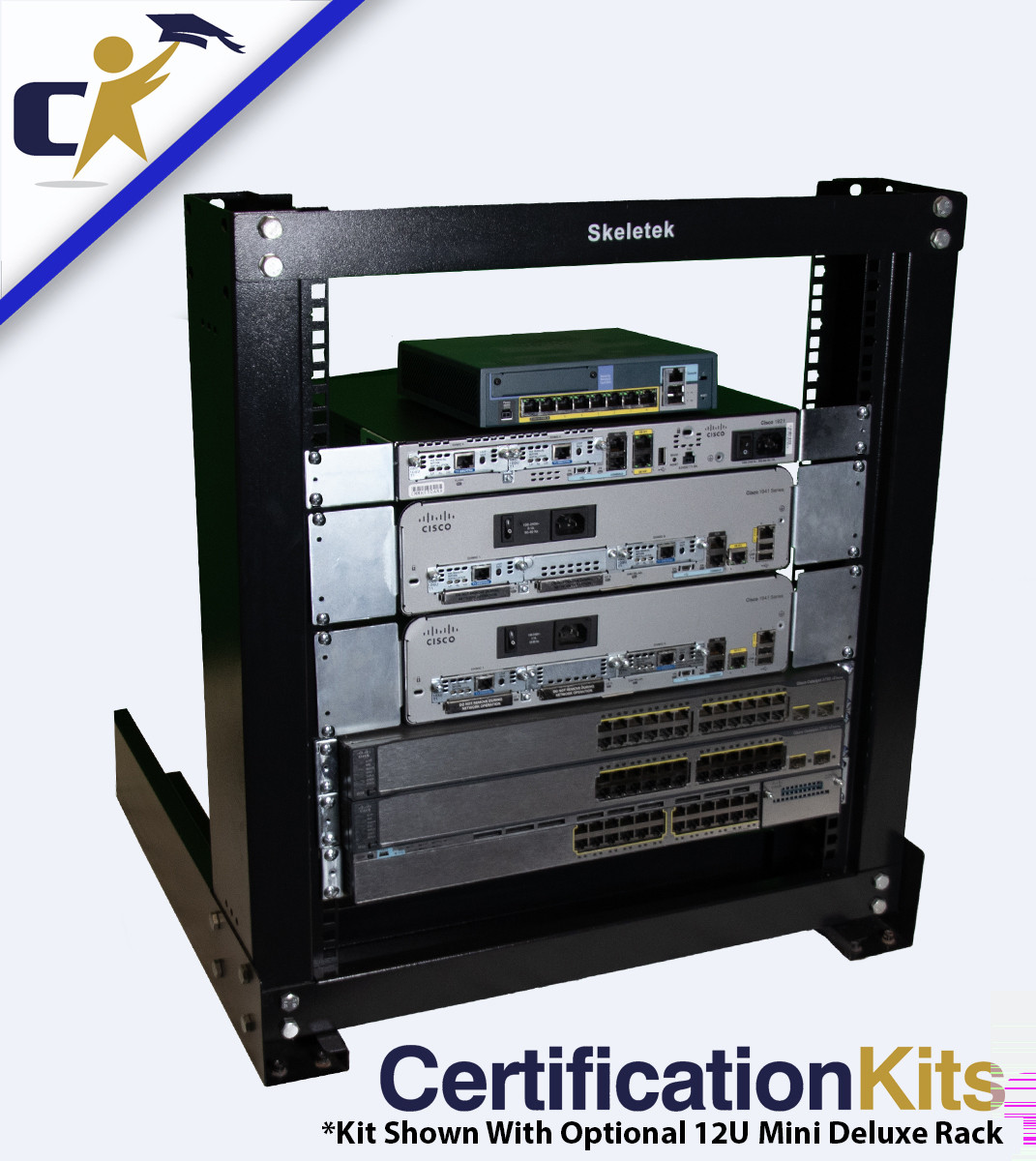
This lab runs all G2 security-licensed routers. It starts with a pair of 1941 Sec/K9 routers, complemented by a 2901 Sec/K9 that adds extra HWIC slots and voice-hardware capability for future expansion. Every router carries both the base and the permanent security license — the setup Cisco recommends for security work — so you can move seamlessly from CCNA labs to hands-on network-security labs and even into CCNP Enterprise. Cisco’s NetAcad notes even list the G2 series as an acceptable replacement for the dramatically more expensive XE routers. Use the drop-down menus to customize to your goals and budget — step up to the 2911 for more NIM slots, or choose a V/Sec (base + security + UCK9 voice) model to explore voice topics. A detailed model-by-model breakdown is further down this page.
The Switches
For the switches, you get a nice mix of our higher-end models. The kit includes a 3750X Series switch — full gigabit, enterprise-grade, running the next step up in IOS with IOS Universal (this is the most affordable security lab we offer with a 3750X built in by default). It’s backed by a pair of 3750v2 switches running IOS 15 with excellent capability. All three are true Layer 3, fully dynamic switches, giving you excellent capability across your entire lab — well beyond the CCNA curriculum and into your security and CCNP studies.
The ASA Firewall
The kit includes a genuine Cisco ASA 5505 security appliance — a great starting point for learning real firewall fundamentals: interfaces and security levels, NAT, access control, and basic VPNs, all on actual Cisco security hardware rather than a simulation. If you want more capability, the drop-down offers an upgrade to the ASA 5510 (with or without the SSM-10 module for anti-virus, anti-spyware, URL/content filtering, and more), or to the ASA 5506-X, which runs newer code. Think of the 5505 as a SOHO-class firewall and the 5510 as enterprise-class; both are outstanding platforms for learning hands-on security.
The ASA options are available in base-license or Security+ license versions. On the 5510 we highly recommend the permanent Security+ license — it unlocks more firewall connections, VPN sessions, and max VLANs, plus security contexts (virtual firewalls), VPN clustering, VPN load balancing, failover, and gigabit ports. On the 5505, the Security+ license mainly adds more firewall connections, VPN sessions, unlimited internal hosts, more max VLANs, and stateless active/standby failover.
Please read below for full details on the included equipment, add-on/upgrade options, and the complete training package that has been time-proven and refined since we built the first lab kits on the market back in 2000. And remember — we know all this can be a little confusing, so we’re always easy to reach and here to help with fast, friendly service.
CCNA is hotter and trending more than it ever has! Always remember that as the CCNA certification progresses, it proves more and more that you know your stuff! With this, so does the amount of money you can expect to make as a Cisco Certified Network Engineer! This is one of the fastest growing fields in the world and with that comes the rewards, if you have the drive! Passing the new CCNA demonstrates that you have the skills and know what it takes to advance quickly in the IT world. We promise you, especially with the rise in data centers; scouts and HR representatives are hunting down qualified CCNAs more than ever before.
Why Real Hardware:
Real hardware will always be the best way to prepare for certification and career success. HR representatives are thrilled to see candidates who’ve worked on real equipment and have their own lab — “What does your home lab look like?” has become a common interview question used to weed out candidates who’ve never touched real gear. Simulators have spent years trying to mimic the real thing and are still full of problems and capability gaps. If you want the best edge on every front, real hardware is the way to go — and it’s an investment that pays itself off quickly if you’re dedicated.
And why buy hardware without the labs to go with it? Other companies offer generic training packages or resell someone else’s product that isn’t designed to work with your equipment. We write our own materials and have refined them for over two decades so they work directly with the gear in your kit. Nothing makes us happier than an email from a customer with a snapshot of their EXAM PASSED certificate.
All of the included routers come with both the base license and the security license, it can be used for both your CCNA exam, CCNP exam and your Cyber Security / Network Security learning!
All of our CCNA 200-301 v1.1 Kits will come with our awesome new, completely revised, CCNA 200-301 v1.1 study material package!
-Our lab kits come with our famous and time proven CCNA Lab eWorkbook! Our labs have been proven to be the best on the market, producing thousands of certified individuals, since 2000 - over the course of over 25 years! The 200-301 v1.1 Lab eWorkbook runs about 450 pages and is jam packed full of labs! Not only do we cover the entire, official 200-301 v1.1 curriculum, but we also go beyond that by fully covering topics otherwise listed only as "describe" so you can fully implement the concept and really understand how everything works. On top of that we included labs that will be very beneficial for your real-world knowledge! Our study materials over prepare you to ensure your success! Don't just be a paper CCNA, be one that KNOWS what they are doing.
This lab eWorkbook comes in digital format on our awesome LockLizard reader. There is an option to pay a small up-charge to enable a single, one-time self-printing right so you can print this off yourself. If you go this route, we highly recommend that you use a laser printer with adequate toner and have lots of paper on hand. It is a lot of pages.
-The CCNA 200-301 v1.1 Bootcamp & Theory eBook is a completely revised, updated and power packed approach to the new Cisco CCNA 200-301 v1.1 exam. This is an 880 page guide of easy-to-understand CCNA material written in a manner that won't bore you to sleep! It not only follows the format of the official Cisco CCNA 200-301 v1.1 curriculum but even goes further in explaining other key concepts that we feel are important to prepare you for the real networking world.
-Our How & Why We Subnet Workbook is a 120 page workbook designed to walk you through the theory of subnetting partnered with enough sample and practice scenarios to have you mastering this skill in no time. This has been newly revised and now includes a bonus IPv6 section! This even includes one-time self-printing rights per copy so you can follow along on paper if you prefer.
-The last pieces to this amazing bundle are our Digital Cram Sheet and Digital TCP/Study Chart. These are very similar to those "Cliff Notes" you may have used when you didn't want to read that novel for a book report. We cram these full of the important points so you can quick reference them daily or directly before your exam. Review these on your PC and even take them with you on your mobile device and use them for a cram session right before your exam. These have been a customer favorite for a long time.
-Our Cisco CCNA Routing & Switching 200-301 Downloadable Study Tools include all sorts of great study tools and resources, free/complimentary mini videos, etc.
Here are just a few items you will find on in this included content:
- 33 CCNA Mini, complimentary Instructional Videos
- CertificationKits Subnet Calculator
- CertificationKits TFTP Server
- All the software you will need to compliment your CCNA 200-301 v1.1 Lab Workbook
- Our new Question and Answer Practice Exam Bundle. Our CertificationKits CCNA 200-301 v1.1 Practice Exams are a collection of 101 questions, answers and explanations (for the tough ones). This bundle comes with both Practice Exam A and Practice Exam B. They are a set of 101 questions, answers and explanation sets each. We thoroughly cover the full CCNA curriculum with the topics you can expect to see on exam day. We have a variety of questions from simple multiple choice, to a comparative version to drag and drop to simlets. These questions are so good and give you such a good feeling on what to expect, that if you can pass these practice exams, you'll know you are ready to go! Trust us, we have seen this test evolve over many, many revisions.
With this release as well as all of the other included eBooks, we even took things a step further by upgrading to our new awesome eBook reader through LockLizard. This is the same engine that Cisco actually uses to protect and distribute their corporate documents. This makes it extra cool because it is a format you will see in the field as a working network engineer. This new ebook reader works on multiple platforms such as PC, MAC, IOS, Android, etc. We include 2 activations with each purchase so you can install it on a desktop AND a mobile device, for example. On top of that you can highlight, make notes and work directly with your document. We know you will love it!
Please feel free to check out a demo selection from our new Bootcamp & Theory ebook and/or the Static Routing Sample Lab from our Lab eWorkbook:
1. Download and install the LockLizard viewer for your IOS and device type from this link: LockLizard Viewer
2. Download and install the License file for the eBook: License File
(If you don't see it open, the window for the license file may pop-up behind your active windows)
3, Download and open the .Pdc eBook file: Theory eBook File / CCNA Lab Workbook Sample Lab
The download and install is very straightforward and simple, but if you get stuck, please click here for a help guide on opening your eBook demo or official purchase. Upon purchase a unique license file and a .pdc file will be emailed to you.
Real hardware will always be the best solution to best prepare you for certification and career success! We can assure you that HR representatives will be thrilled to know that you have worked on real equipment and even have your own lab equipment! We are even finding that, “What does your home lab look like?” has become a common interview question as a way to weed out candidates that have never even touched real equipment. Simulators have spent a long time trying to mimic the real thing and after many years, they are still full of problems and capability issues. If you want to do things the right way, that will give you the best edge you can get on all fronts, real hardware is the best way to go. Remember, this is an investment in your future that will pay itself off quickly if you are dedicated. Networking remains one of the fastest growing career paths in the world and there is only room to grow!
Why would you spend hundreds of dollars or more on a lab kit if you don't get the labs that accompany your equipment? Other companies offer training packages, but they are generic or simply selling someone else's product that isn’t designed to work directly with your equipment. To ensure the highest quality, we invest an incredible amount of energy into providing CCNA training materials that are written by us and have been refined for over two decades. We are passionate about providing the best for our customers and love nothing more than when we get an email back from a customer with a snapshot of their EXAM PASSED certificate. Finally, we include our TFTP Server, Subnet Calculator, 35 CCNA Instructional Videos and so much more.
Below is a listing of the kit with its standard selections to which you can select any of the add-on or upgrades options - described in further detail below.
Hardware Included:
- Tested and Guaranteed working!!
- One 2901 Sec/K9 Router Security Licensed ISR G2 512/256 (includes base and security licenses) routers IOS Universal 15
- Two Cisco ISR G2 1941 Security license 512/256 (includes base license) router IOS Universal 157-3.M
- One 3750X Series Fully Dynamic, True Layer Three 24 port Gigabit with IOS Universal 15
- Two 3750v2 Fully Dynamic, True Layer Three 24 port FastEthernet with IOS 15.0(2)SE10 IP Services
- Six HWIC-1DSU-T1 Serial Modules
- Three WIC Serial Crossover Cables
- One ASA 5505 v9.x Capable Security Device (or upgrade to the 5510 with or without the SSM-10)
- Six Power Cables
- One ASA Power Brick
- Console cable kit
- Five Ethernet Crossover Cables
- Five Ethernet Patch Cables
- 1 Year Warranty!
Additional Items Include:
- 450 Page CCNA 200-301 v1.1 Lab eWorkbook Covering 60+ Labs Plus Bonus Labs That Go Beyond the Scope of CCNA For Extra Real World Experience! ($57.99 value)
- 880 Page Bootcamp & Theory eBook that covers every 200-301 v1.1 CCNA Topic Plus More! ($49.99 value)
- How & Why We Subnet eWorkbook ($24.99 value)
- Two Practice Exams. Both with 101 Questions, Answers and Explanations ($15.98 value)
- Digital CCNA CRAM Sheet ($14.99 value)
- Digital TCP/IP Study Chart ($9.99 value)
- CertificationKits TFTP Server
- CertificationKits Subnet Calculator
- 33 CCNA Instructional Videos
- Cisco Network Assistant
- Cisco Router Password Decryptor
- Cisco VPN Client 5.0.04.0410
- Port Scanner nmap-7.80
- npcap-0.9987 & WinPcap 4.1.3
- WireShark
- TeraTerm & Putty Terminal Emulators
- VirtualBox
- IOS Backup as noted above for the routers and switches
- Cisco Configuration Professional (CCP) 2.8 for 1841/2800 Series Routers
Optional Upgrade To Smart Serial Cards & Cables Includes:
(Replaces 1DSU-T1 cards and WIC-Crossover Cables)
- HWIC serial Module/s (6 smart serial ports total)
(Total smart serial ports = 6. Two smart serial ports per device)
- Three Smart to Smart Back-to-Back Serial Cables
***Why should you consider upgrading from the HWIC/WIC-1DSU-T1 Serial cards to the Smart Serial Cards?***
The HWIC/WIC-1DSU-T1 Serial cards are a great, budget friendly option for lab purposes. However, if your budget allows, we always recommend upgrading to the smart serial WIC cards and Smart Serial-to-Smart Serial cables. Smart serial is a more current technology that offers a faster DCE/DTE connection that will also use the same clock rate command you will see in all of your labs on every exam, regardless the level. Once again, the HWIC/WIC-1DSU-T1 Serial cards will work just fine (the clock rate command is slightly different and that difference is covered in our CCNA Lab Workbook), but if you want to be the most up to date and want the clock rate commands to match identically like you would see when you are sitting your exam, the smart serial upgrade is an excellent choice.
The G2 Router Upgrade Options provide you with a wide range of models across the series. The default selection on two of the routers here are one 1941 Security License. The third router is one 2901 security licensee. The 1941 is a step up from the 1921 that you see as the default in many of the kits. It is a 2U device. The 2901, which in many ways is our techs favorite brings the modules slots up from 2 slots to 4, is capable of accommodating voice hardware/capability and runs on the IOS for the 29xx. The 2901 is a 1U device (conserves rack space). The final option is the 2911, which is the largest/heaviest unit (shipping is a little more for these because of the added weight) and also because it is a 2U device. The 2911 has the most expansion options with additional module NIM slots, 4 HWIC slots and can also accommodate voice hardware upgrades. All of these are available to be upgraded with the security license option. This is a permanent license that adds to the base license and is pre-installed and unlocks a lot of additional capability and security features. The 2901 and 2911 are additionally available as the V/Sec licensed model. This is Base + Security + UCK9 (voice). This is a good option if you also want to explore voice topics in the future and want your device full featured.
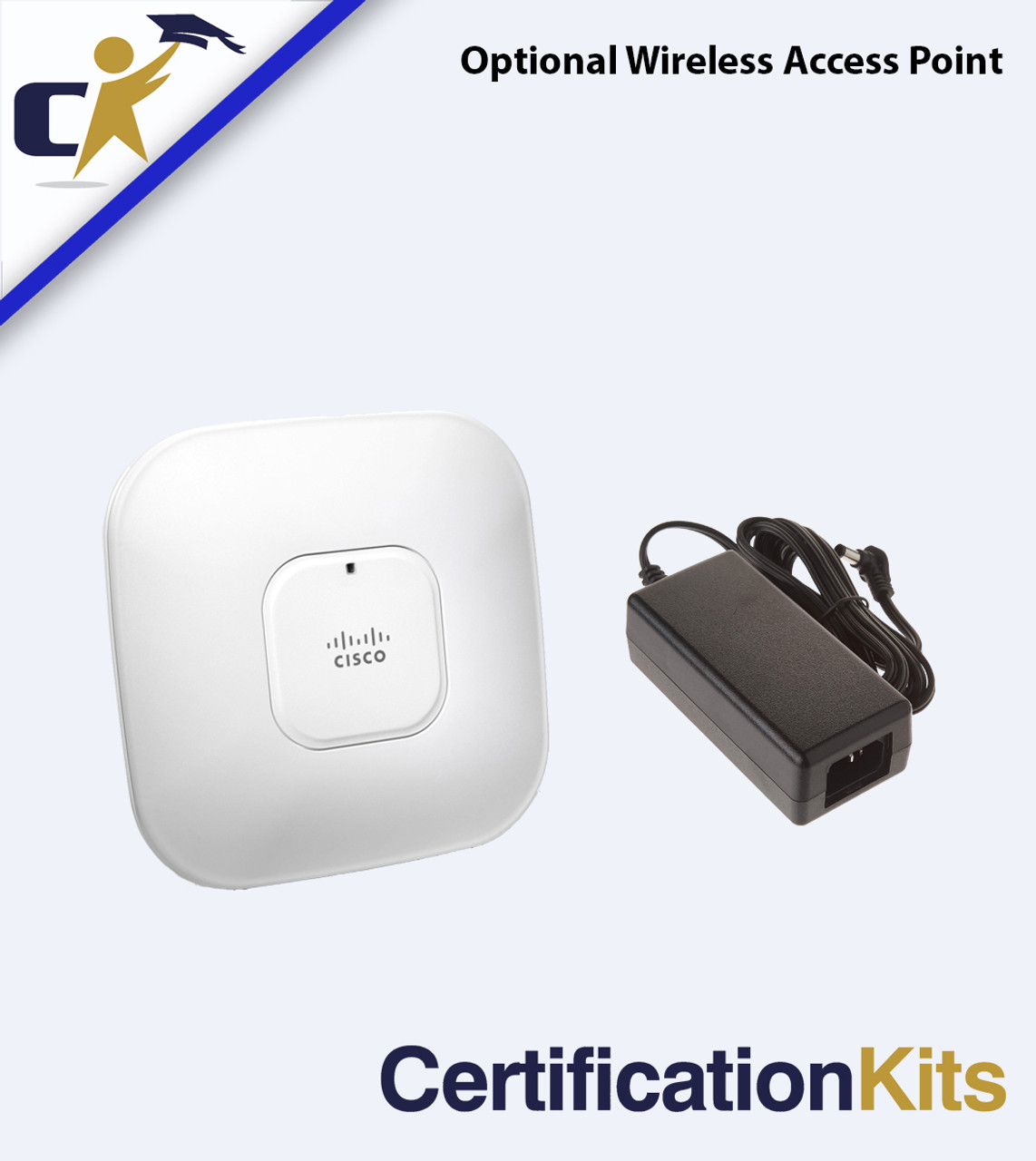
The Optional Wireless Access Point Option comes with an 1142 Wireless AP and the power brick for the unit. Once again, you do not need this to get through the wireless component of the 200-301 v1.1 exam. However, this is a pretty cheap add-on that will give you an opportunity to expand your knowledge past the exam. There is nothing wrong with being a little over-prepared!
The Supplemental CCNA Training DVD is about 22+ hours of extra CCNA level training in a video format. Do you need this to pass your exam? Absolutely not because all the training your need is already included with your kit! This DVD does cover a lot of legacy material and is not entirely up to date, however it still has a great deal of very useful knowledge that every engineer should know and will run into on the job. We used to sell this DVD for a few hundred dollars but have priced it super affordably for those who want to widen the scope of their curriculum. There is still a lot of overlap here with the current exam, so you will get a lot of topics covered that are on there, just not every topic.
The FTDI Console Cable Upgrade swaps out the classic console cable for this new solution to complete your console connection. This is our newest option for your console connection. This cable has the new FTDI chip installed and eliminates the need for both the classic console connection and the USB-Serial Adapter! It goes directly from USB to RJ-45! Another great bonus to this, from our testing, is that it has a near perfect success rate in the break sequence working! (used to reset the router, password recovery, etc). This is a big bonus because the converters can be a bit of a pain in that department. All around, this is an excellent addition to any techs toolbox! *If you do not have a 9-Pin serial port on your computer (most modern computers do not) or a USB-to-Serial converter, you will need this to complete your console (management) connection. We highly recommend this.
The Access Server is purely a convenience tool and not a requirement for your exam. While these are common device types in data centers everywhere and a great thing to have knowledge of, they are not a requirement to pass your exam. However, if you don't want to physically move a cable every time you change devices, have an interest in remote access possibilities, or want to broaden you knowledge, an access server is a great device to have in your kit! All of our 2509 and 2511 access servers sold with kits also now come with the transceiver add-on so you can get the device on the LAN, perform upgrades/recovery and explore remote access capability. The new Access Server Conversion Kits options are composed of a 2811 256/64 router and HWIC-16A module. There are two options. One with (1) 8 connection octal and one with (2) 8 connection octals (16 connections). More on access servers here.
Rack Options: You can see our Rack options in the slide carousel images above. We aim for a modular solution. Choose no rack and stack on a desktop, buy just the rack-mount kits if you already have a rack, or select one of three rack options (all bundled with rack mounts when purchased with a kit):
- Rack Mounts Only — the brackets to bolt your devices into a rack you already own.
- The Basic Rack is the simplest option. This is a more organizational solution versus the heavier duty deluxe rack options. This works great as a simple desktop rack on smaller labs where you don't plan on adding an incredible amount of weight.
- The 12U Mini Deluxe This is a customer favorite rack option and a sturdier option for your lab over the Basic Rack. For most CCNA and Cisco labs, you are only using 6U of space in your rack, so the 12U Mini Deluxe will give you plenty of space with expansion options for a budget friendly price. If you plan on adding larger units, PDU, shelves, etc. then the 12U mini provides a couple extra slots
- 16U Deluxe - This is the full heavy-duty option! This rack is a professional grade rack that comes with wheels and extra room for expansion. This rack is also nice because it stands taller than the other racks, bringing the equipment higher to chair level if placed on the ground.
You also get all of our CCNA training study materials, so it is multiple labs in one!
This is a complete Cisco certification kit — much more than just the hardware. We include the gear you need and all the study material you need, in one kit. No other kit on the market offers such an in-depth solution to prepare you from every angle.


